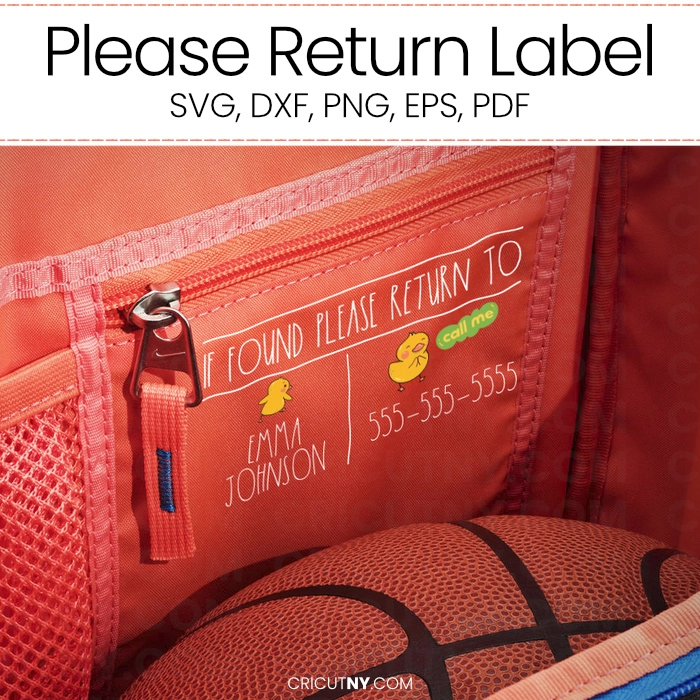
Please Return Label for School Supplies
Here's a Lost and found label. Isn't it cute? I like it so much!
Are you tired of your little one losing everything at school? This simple and convenient idea will save all your back-to-school supplies, giving you one less thing to worry about.
How often did you say, "Don't lose it this time, or Mommy won't buy you another one, ok"? That idea might fix the problem, and it's so simple to do.
Put your child's name with your phone number, and if something like a backpack, lunch box, or even clothing is lost, there is a big chance someone will call you back from school or another parent.
That idea is from Cricut, but I wasn't too fond of the design, so I took the initiative to create a much cuter template. Even your child will like it, and it's essential for both of you to feel a part of this solution.
I would place this label inside or under the backpack or the school supplies. It will be discreet but still be there in case it's needed.
This Please Return tag label is free via your Premium account.
The 'Please return' label design is available in a variety of file formats, including SVG, DXF, PNG, EPS (vector), and PDF. This versatility means it can be used in various cutting machine software/Apps or any design software such as Adobe Photoshop, Affinity Designer, Adobe Acrobat, Word, etc. It even works on Canva, giving you the freedom to use it in the way that suits you best.
I used the Rae Dunn font for the child's name and included the phone number as a side note.

available files.
PDF file
Images with transparent background, 300 DPI resolution. This file format is mostly used for printing at a printer shop. This is not required with a cutting machine.
JPEG Files
JPEG Images are provided in a printable version on a white background at 300 DPI. The size is large enough to cover the entire shirt.
PNG files
PNG Images are provided in a printable version with a transparent background at 300 DPI. The size is large enough to cover the entire shirt.
EPS files
Images with transparent background, 300 DPI resolution. This file format is mostly used for printing at a printer shop. This is not required with a cutting machine.
SVG Files
Use the SVG design with Cricut Design Space, Silhouette Cameo (Upgrade Edition), and other cutting machines, design applications and laser cutting machines.
Compatible With

Cricut Design Space

Silhouette Studio

ScanNCut

Canva website
glowforge

All Cutting Machines
Procreate

Image processing software

Text processing software

Operating Systems