✨ Cricut’s New BFF: Try This True Writing SVG Font (Pen-Perfect!)

✨ Cricut’s New BFF: Try This True Writing SVG Font (Pen-Perfect!)

💌 Write Like Magic! True Writing Font That Looks Handwritten


This true single-line font is specially made for Cricut Joy, Explore, Maker — and even Glowforge! Perfect for cards, labels, invites, and custom gifts.


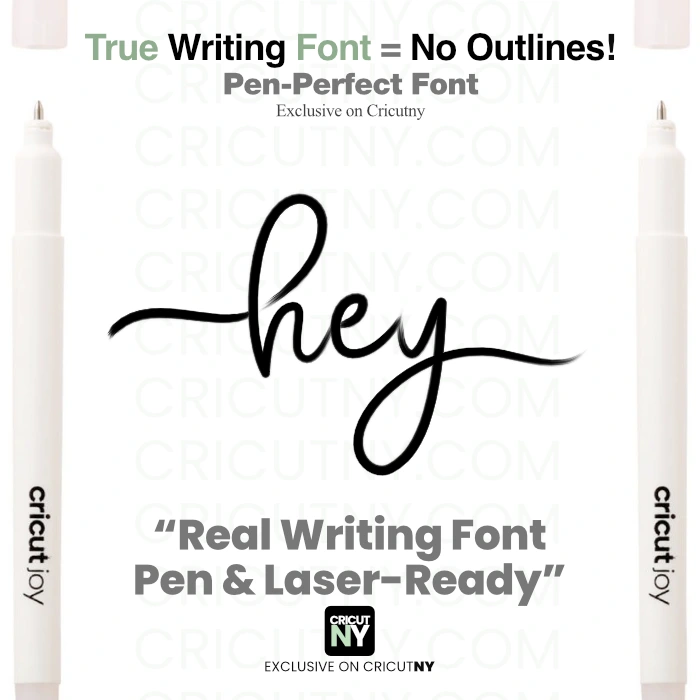
✨ Unlike regular fonts, this one uses SVG format so your machine writes, not outlines.

No more bubble letters — just smooth, clean strokes that look beautifully handwritten.


🎯 Perfect for projects like:

• Personalizing thank-you cards or wedding invitations

• Writing gift tags that look store-bought

• Adding names on baby shower favors

• Creating engraved jewelry with Glowforge

• Crafting cute recipe cards, journal pages, or planner stickers


💡 Why no .TTF font file?

Cricut Design Space doesn’t support real single-line writing with font files. Even if you install a .TTF, Cricut will still outline it. That’s why we provide an SVG file — it’s the only way to get real pen writing results!


✅ Easy to use

✅ Perfect for beginners

✅ Clean, elegant results every time


Thanks for supporting small creators!

— Helen 💛


cricut Writing Font


cricut Writing Font


cricut Writing Font for wedding


For the cleanest writing, use a Cricut fine-point pen (0.4) or a gel-style pen for darker, smoother strokes. You’ll love the results!

cricut writing font


Bonus! Includes 10 pre-made words like “Thank You” and “First” – ready to draw in seconds!

cricut writing font glowforge silhouete cameo


canvas image
canvas image
canvas image

available files.

SVG Files

Use the SVG design with Cricut Design Space, Silhouette Cameo (Upgrade Edition), and other cutting machines, design applications and laser cutting machines.

Compatible With

Cricut Design Space

Cricut Design Space

Silhouette Studio

Silhouette Studio

ScanNCut

ScanNCut

Canva website

Canva website

glowforge

glowforge

All Cutting Machines

All Cutting Machines

Procreate

Procreate

Image processing software

Image processing software

Text processing software

Text processing software

Operating Systems

Operating Systems

Resizable Design
Editable File

Frequently Asked Questions

Yes! Your purchase includes both personal and commercial use. You’re free to use it in products you sell — like cards, labels, mugs, etc. Just don’t resell the file itself.
Yes! This true writing font is perfect for Glowforge scoring, because it uses single lines, not outlines. Just import the SVG into Glowforge and set it to “Score” — it’ll draw clean, smooth lines with no fill needed. Great for engraved handwriting on wood, acrylic, and more.
Nope! Just install it like any regular font on your computer. Then, when you use it in Cricut Design Space or Silhouette Studio, be sure to set the Linetype (or Operation) to “Draw” — and you’re good to go!
It’s made for drawing, not cutting. Since it’s a single-line design, cutting it may result in faint or incomplete shapes. For cutting, use bold SVG fonts or cut-optimized files.
We recommend uploading SVG fonts from a desktop or laptop. Some mobile apps have limited SVG handling, so for best results, set up your design on desktop first.
Yes! You can resize, adjust letter spacing, or ungroup letters for full control — just like any other SVG.
Yes! This is a true writing font, meaning it’s made to draw clean, single lines with your Cricut or Silhouette pen — no fills, no workarounds. It writes just like handwriting, with no messy double outlines like standard fonts.
True writing fonts use single-line paths that aren’t supported by standard font formats like .TTF or .OTF. If we gave you a regular font file, your machine would try to draw the outline, not the actual letter line. That’s why we use SVG — so it draws clean, pen-perfect strokes.
Hello, I'm Helen, a visual designer. Cricutny is a community and platform catering to crafters and sellers searching for popular designs for their cutting and laser machines or for resale. Our team of 14 designers creates custom fonts and designs fully compatible and optimized for cutting and laser machines. Recently, Cricutny expanded its offerings to include fully customized printable gifts. Cricutny is your one-stop craft haven for creating the most unique art.
Yes. Active members are permitted to use CricutNY designs to create and sell physical finished products, such as signs, apparel, decor, and personalized items. The membership includes a commercial-use license for physical products. Reselling, redistributing, or sharing the digital files themselves is not permitted.
Yes. This premium design is included with your CricutNY membership. With one active membership, you get access to our entire design library — including premium bundles and exclusive releases. Members also receive access to additional bonus resources, including our premium font collection.
CricutNY operates on a membership model rather than selling individual files one by one. This allows us to keep pricing accessible while continuously expanding the design library for our members. Instead of paying $5–$20 per file elsewhere, members gain access to the entire collection under one plan. Our goal is simple: provide high-value designs at a price that makes sense for hobbyists and small businesses alike.
Of course! To make a request, simply click on the "Design request" button at the bottom of the page if you're using a computer or click on the icon located at the bottom left if you're on a mobile device. You are more than welcome to request a font or a design. Our team loves creating new stuff every day and would be delighted to accommodate your request if we can find the time. We look forward to hearing from you!